See Guardian Lock in action
Open the parent controls, then look at real YouTube views from the product recording. The controls on this page are a sample and do not change your browser.
Guardian Lock
Chrome Parent Control Center
Language
Choose the language for this interactive demo. The recorded video and screenshots remain in English.
License
Enter the license key you received after purchase.
License active. Sample status.
Parent Access
For this preview, enter 1234.
YouTube Status
Lock restricts YouTube to approved channels. Unlock allows normal YouTube.
Approved Channels
2Block YouTube Shorts
When Guardian is locked, Shorts can be blocked.
Ad Shield Message
Personalize the short message shown while Guardian Lock covers a YouTube advertisement. Maximum 180 characters.
Guardian Lock will also show: “If a Skip Ad button appears, you may click it.”
What your child sees
These stills come from the actual Guardian Lock browser recording. Choose a moment to inspect.
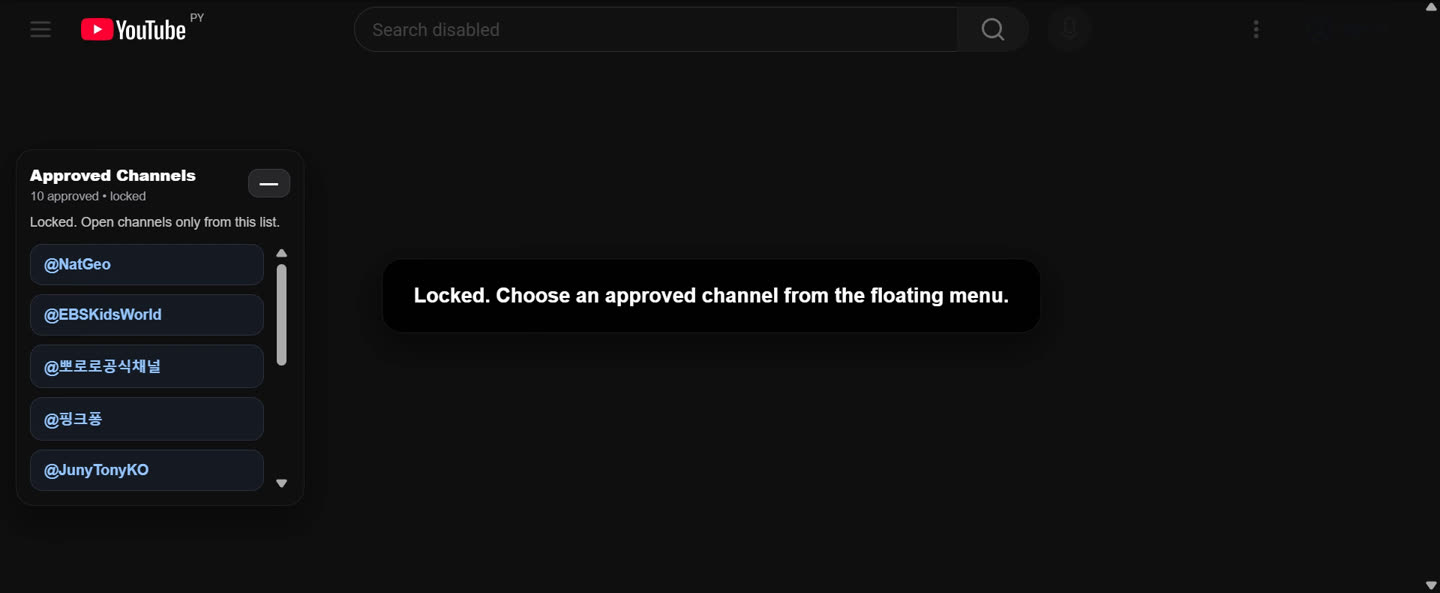
These images show a recorded example with that computer’s approved channels. The sample controls above do not edit the recording.
Watch real browser excerpts
See the parent controls, locked browsing, approved video, and unlocked YouTube from the same recording.
Ready to use it on your family’s computer?
Try Guardian Lock free for 7 days. Nothing charged today; then $14.99 per year unless canceled. Up to 4 devices.
Start my 7-day free trial ↗